You probably know the Sweepsouth app as the place to book a trusted SweepStar when you need a little extra help at home. But there’s more to it than finding someone to take care of your cleaning.
From managing multiple properties and saving your favourite SweepStars to keeping track of payments, earning rewards and managing your private domestic worker, the Sweepsouth app has plenty of features designed to make life easier.
Whether you’re a regular customer or haven’t explored the app in a while, here are 10 things you might not know you can do.
1. Get a quote tailored to your home
Every home is different, so your booking shouldn’t be a one-size-fits-all arrangement.
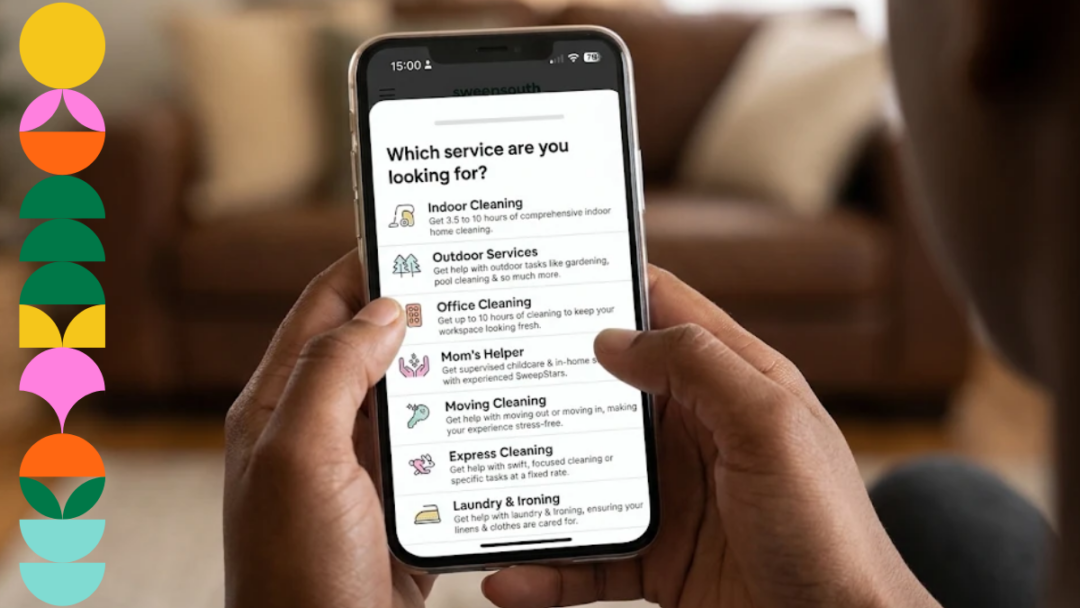
When you book through the Sweepsouth app, you can select the service you need and provide details about your home and the tasks you want completed. You’ll then receive a tailored quote based on your requirements.
Whether you need Indoor Cleaning, Laundry and Ironing, Outdoor Services or something else, you can explore your options and get your booking started in just a few steps.
2. Manage bookings for more than one property
Looking after more than one property? You don’t need to juggle separate accounts to keep your bookings organised.
The app allows you to add multiple properties to your account, making it easier to arrange services for different locations. You can also link bank cards to individual properties, helping you keep payments organised.
It’s particularly useful if you manage your own home as well as a rental property, holiday home or another space that needs regular attention.
3. Edit your bookings when plans change
Life doesn’t always go according to plan. Meetings run late, appointments move and sometimes you need to change your schedule.
With the Sweepsouth app, you can view and manage your bookings in one place. Need to change your appointment? You can edit, cancel or reschedule a booking through the app, giving you more flexibility when things shift.
No need to start from scratch just because your plans have changed.
4. Save your favourite SweepStars
When you find a SweepStar you enjoy working with, you can add them to your favourites in the app.
This makes it easier to find and rebook them when you need their services again. If you’d prefer a more consistent routine, you can also arrange weekly bookings with a SweepStar you trust.
It’s a handy feature if you’ve found someone who understands your preferences and the way you like things done at home.
5. Contact your SweepStar through the app
Sometimes you need to communicate a few details before an appointment. Perhaps there’s something specific you’d like your SweepStar to know about your booking, or you need to get in touch to discuss arrangements.
The app allows you to call or message your SweepStar directly, keeping communication convenient and connected to your booking.
6. Get reminders and real-time notifications
Forgotten about an upcoming appointment? The app helps you stay in the loop with reminders and in-app notifications.
You’ll receive updates to help you keep track of your bookings, so you can plan your day around your appointment and stay informed about what’s happening.
One less thing to keep track of in your already busy schedule.
7. Choose how you want to pay
You don’t have to rely on one payment method when booking through Sweepsouth.
The app supports several payment options, including:
- Bank card
- Instant EFT
- SnapScan
- UCount Rewards
You can also link different bank cards to different properties, making it easier to manage payments when you book services for more than one location.
8. Load SweepCred for future bookings
Here’s one you might not have explored yet: SweepCred.
SweepCred allows you to load credits into your Sweepsouth account and use them towards upcoming bookings. You can purchase SweepCred through the app using a supported payment method, then select your available credits when making a booking.
You can also receive SweepCred through eligible promotions and referral rewards.
It’s a convenient way to keep credits available in your account for the next time you need a little help at home.
9. Rate your SweepStar and leave a tip
Your feedback matters. Once your booking is complete, you can rate your SweepStar through the app and share your experience.
And if you’d like to show a little extra appreciation for a job well done, you can also leave a tip after the appointment.
It’s a simple way to recognise the people who help make your home and routine a little easier.
10. Manage your private domestic worker with MyHome Hub
Did you know you can use the Sweepsouth app to manage your own private domestic worker?
MyHome Hub is designed for households that already have a private domestic worker and want an easier way to manage the arrangement. Through the platform, you can set your own rate, manage bookings and payments, receive updates and access support when you need it.
Your worker receives the full agreed rate, while Sweepsouth provides the tools to help manage the arrangement.
It’s another way the app goes beyond once-off service bookings to make household management more convenient.
Bonus: Refer friends and make the most of exclusive offers
There’s another reason to keep the Sweepsouth app handy: you can get more value from being a customer.
Through the Refer and Earn programme, you can invite friends and family to try Sweepsouth using your unique referral code. When they complete an eligible first booking, you can earn SweepCred towards your own future bookings, while they get a discount on theirs. Terms and conditions apply.
It’s also worth keeping an eye out for exclusive offers, promotions and discounts. Check your account and the app regularly so you don’t miss an opportunity to save on a service you already need.
More than bookings: Make the most of your Sweepsouth app
The Sweepsouth app brings together more than just the ability to book a service. It’s a practical way to manage appointments, keep track of payments, stay connected with your SweepStar and access features that make organising your home easier.
Whether you’re booking a once-off service, building a regular routine or managing a private domestic worker through MyHome Hub, there’s plenty to explore.
If you haven’t downloaded the app yet, or haven’t checked out its features in a while, now’s a good time to take a look.
Download the Sweepsouth app, explore what it can do and find more ways to make life a little easier.

ALSO SEE: KINDNESS GOES BOTH WAYS: REAL SWEEPSOUTH REVIEWS FROM CUSTOMERS AND SWEEPSTARS